
Reviews
Tilt Ball Speed Challenge is a delightful, no-frills reflex game that excels at what it does. The core mechanic of guiding a ball with your mouse against a timer is both simple and incredibly engaging. Its clean interface and immediate feedback make it easy to pick up, while the pursuit of a better time provides lasting replay value. The game is family-friendly and suitable for all ages, making it a great choice for a quick mental break. It is a pure test of hand-eye coordination that is both challenging and rewarding.
Description
Game Introduction
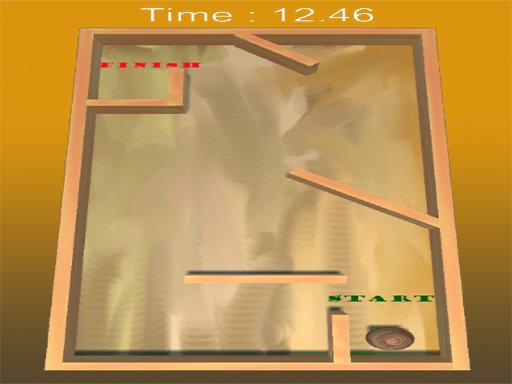
Tilt Ball Speed Challenge is a free online reflex game that focuses on quick thinking and precise mouse control. The core objective is straightforward: players use their mouse to guide a ball from one point to another on the screen. What sets this game apart is the addition of a countdown timer, which adds a sense of urgency and encourages players to complete the task as quickly as possible. This simple yet engaging mechanic makes it ideal for players of all ages who enjoy testing their reaction times. The game is designed for short, satisfying sessions, making it perfect for a quick break or a fun challenge. Its clean interface and minimal instructions ensure that anyone can start playing immediately without any prior knowledge. The experience is centered around improving personal performance, as each attempt offers a chance to beat your own best time. This focus on self-improvement and the absence of complex rules make it a welcoming choice for casual gamers and those new to online gaming. The game’s appeal lies in its simplicity and the addictive nature of trying to shave off a few seconds from your previous record.
How to Play
To play Tilt Ball Speed Challenge, players typically use their mouse to control the ball's movement across the screen. The main goal is to navigate the ball from a starting point to a finish area before the timer runs out. The controls are intuitive and require only moving the mouse, with no buttons or keys to press. The game provides immediate feedback on your performance, showing your completion time after each attempt. Players can repeat the level as many times as they wish, with each run offering a fresh opportunity to improve. The straightforward nature of the gameplay means that the challenge comes from your own speed and accuracy rather than from complex puzzles or enemies. This makes it a pure test of hand-eye coordination and quick reflexes.
Game Features
Tilt Ball Speed Challenge includes several features that enhance the playing experience. The game is built around fast-paced, mouse-controlled movement, with a countdown timer that adds pressure and excitement. It is designed for quick play sessions, focusing on speed and precision. The interface is clean and intuitive, allowing players to start playing without any learning curve. A key feature is the ability to track your best time, which encourages repeated play and self-improvement. The game is family-friendly and suitable for all ages, with no violent or inappropriate content. It offers a simple yet addictive challenge that is easy to pick up but difficult to master.
Tips for Success
To succeed in Tilt Ball Speed Challenge, focus on making smooth, controlled mouse movements rather than rushing. Practice regularly to improve your hand-eye coordination and reaction time. Staying calm under pressure will help you avoid mistakes that cost valuable seconds. By repeating the game, you will learn the most efficient paths and anticipate the ball's movement, leading to faster completion times.










03 Comments
Sign in to comment
You must be logged in before posting a review or rating.
No account? Create one
No comments yet. Be the first to comment!